Device Settings
Adjust device settings, view system information, and configure how your Air Lab captures data.
The Settings program gives you access to device information, power controls, and configuration options. Navigate to it from Prof. Robin's computer in the Lab.
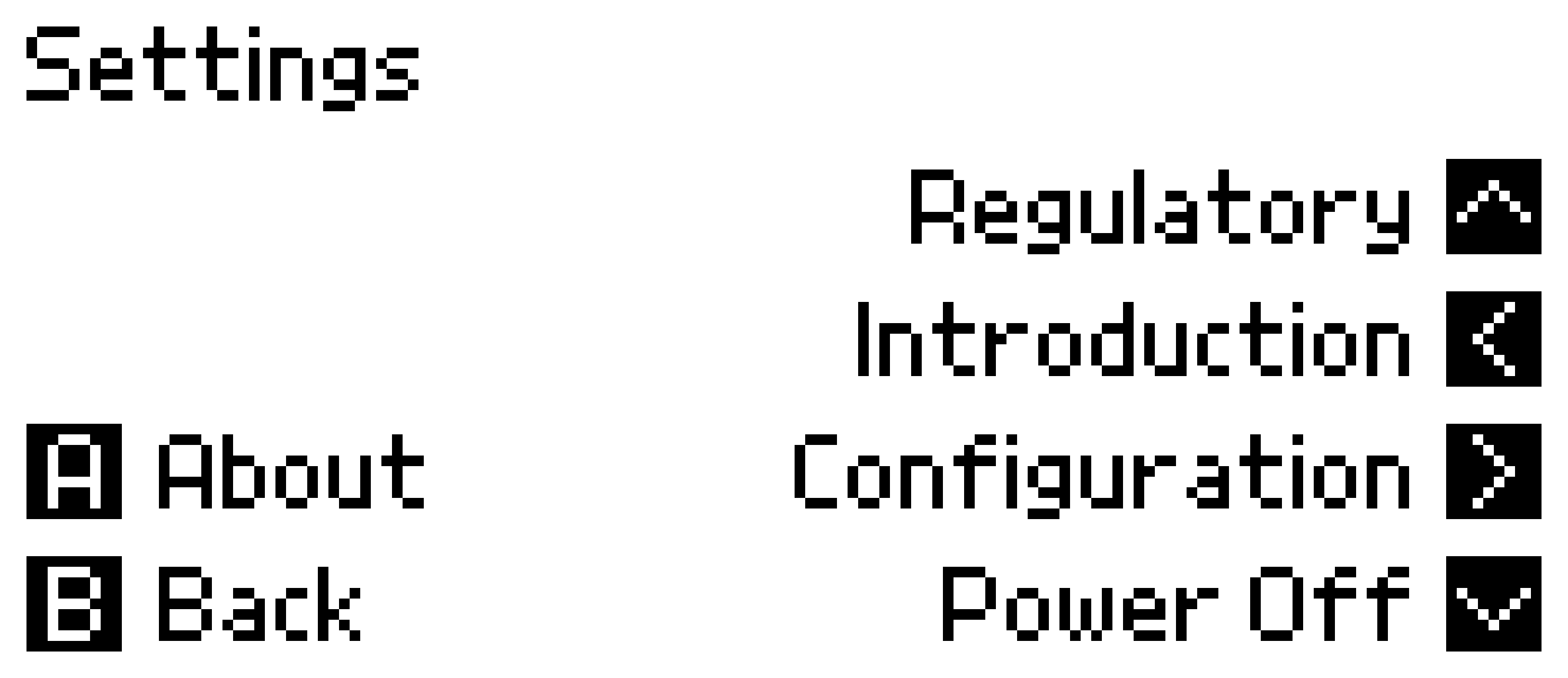
Power Off
To power off your Air Lab, enter Settings and press . The device will shut down completely.
Tip: To store your Air Lab long-term, use Shipping Mode in Developer Mode instead—this disconnects the battery to prevent discharge.
About
Press in Settings to view device information:
- Device Name: The name shown during Bluetooth pairing (customizable via Air Lab Console).
- Serial Number: Your device's unique identifier.
- Firmware Version: The currently installed firmware.
- Storage: Available space for recordings (internal) and CSV files (external).
Regulatory
Press in Settings to view regulatory information and certifications.
Introduction
Press in Settings to replay the onboarding tutorial that appears when you turn on the device.
Configuration
Press in Settings to access configuration options. Here you can adjust language, date and time, sampling rates, and other preferences.
Note: Some settings like Device Name and Wi-Fi Network can only be changed through Air Lab Console. They appear here for reference but can't be modified on-device.
System
- Language: English, German, and Spanish are available.
- Date & Time: Set the current date and time, entered in your local time zone. If you skipped this during setup, adjust it here.
- Time Zone: Your local time zone. It changes how times are displayed on the device's screen and in Air Lab Console—all recorded, exported, and transmitted data is timestamped in UTC. Setting a time zone also enables automatic network time synchronization.
- Power Light: The LED blinks white while charging and stays white while USB is connected but not charging. Set to Off to disable the white LED entirely.
- CO₂ Light: Enables or disables the CO₂ level indicator LED. See Indicator for details.
- Temperature Unit: Switch between Celsius (°C) and Fahrenheit (°F).
- BLE Prevent Sleep: Keeps your Air Lab awake while a Bluetooth connection is active instead of going to sleep.
- MQTT Prevent Sleep: Keeps your Air Lab awake while connected to MQTT.
- Wi-Fi Network / MQTT Broker: Displays current network settings.
- Bluetooth Pairing / Bonding: See Bluetooth Pairing for details.
- Altitude ASL: Your location's height above sea level. Air Lab uses it to report atmospheric pressure normalized to sea level (hPa), so your readings line up with the values published by weather services. Leave it at 0 to report the raw pressure measured at your location. See Atmospheric Pressure for background.
- Clock Calibration: Adjusts the clock drift in parts per million (−63 to +126). Negative values slow the clock, positive values speed it up.
- Full Reset: Erases all data on the device, including recordings and settings.
Sample Rates
These settings control how often your Air Lab captures data. See Sample Collection for details on how sampling works.
- Sleep Sample Rate: How often samples are taken in sleep state. Options: 5, 30, or 60 seconds (default: 30).
- Record Sample Rate: How often samples are taken during a measurement. Options: 5, 30, or 60 seconds (default: 5).
- Long-Term Interval: How often samples are written to the long-term buffer. Range: 30–900 seconds in 10-second increments (default: 60).